








Std XI Result software – Arts, Commerce and Science

Arts Faculty
Std XI Result software-Arts Faculty – कला शाखेचा निकाल बनवा
Result Software for Arts
New Type of Marksheet and Booklet-
1) Download the consolidated sheet of Marks – Excel File
👇👇 Download the file. Use Save as option and save the file in new folder of laptop.
Consolidated Sheet– Click on the following link and download the excel sheet of consolidate marks.

1) Click on File and click on Download. The excel file will download. Use this downloaded excel file for filling marks.
वरील लिंक ला क्लीक करून एकत्र गुण तक्ता डाऊनलोड करा.
त्यानंतर File वर जा आणि Download वर क्लिक करा. एक्सेल फाइल डाउनलोड होईल. गुण भरण्यासाठी ही डाउनलोड केलेली एक्सेल फाईल वापरा.
OR
Click on the following words and download the Excel file. Save it on computer or P.C.
खालील शब्दांवर क्लिक करा आणि एक्सेल फाइल डाउनलोड करा. ती संगणकावर किंवा पी.सी. वर सेव्ह करा.
2) Save as the sheet using new name in your P.C. or Laptop.
तुमच्या P.C किंवा लॅपटॉप मध्ये संकलित तक्ता नवीन नाव वापरून सेव्ह करा.
3) Fill consolidate sheet with marks of unit test 1 and 2, first term exam, annual exam.
युनिट चाचणी 1 आणि 2 च्या गुणांसह प्रथम सत्र परीक्षा, वार्षिक परीक्षा यांचे गुण भरा.
4) Annual exam marks include oral or internal evaluation marks.
वार्षिक परीक्षेतील गुणांमध्ये तोंडी किंवा अंतर्गत मूल्यमापन किंवा प्रात्यक्षिक परीक्षा या गुणांचा समावेश होतो.
5) For languages there are 20 marks for oral exam.
भाषांसाठी तोंडी परीक्षेसाठी २० गुण आहेत.
6) For other subjects like- History, Economics, Co-operation, Psychology, Sociology etc. have internal exam for 20 marks.
इतर विषयांसाठी जसे- इतिहास, अर्थशास्त्र, सहकार, मानसशास्त्र, समाजशास्त्र इत्यादी 20 गुणांसाठी अंतर्गत परीक्षा असते.
7) For subjects like Geography, there are 20 marks for the practical exam.
भूगोलासारख्या विषयांसाठी प्रात्यक्षिक परीक्षेसाठी २० गुण असतात.For Std XI Result software-Arts Faculty, download the booklet.
Instructions of using the software is given in the last page of the excel sheet.
Excel sheet शेवटच्या पेजवर software वापरण्याच्या सूचना आहेत.
2) Download the Marksheet – Word File
👇👇 Click on the following words and download the file. Use Save as option and save the file in new folder of laptop.
Marksheet
वरील शब्दांना क्लीक करून Marksheet डाऊन लोड करा.
For Std XI Result software for Arts Faculty, download the Marksheet.
3) Download the Booklet – Word File
👇👇 Click on the following words and download the file. Use Save as option and save the file in new folder of laptop.
Booklet
वरील शब्दांना क्लीक करून Booklet डाऊनलोड करा.
Front Page of Booklet-
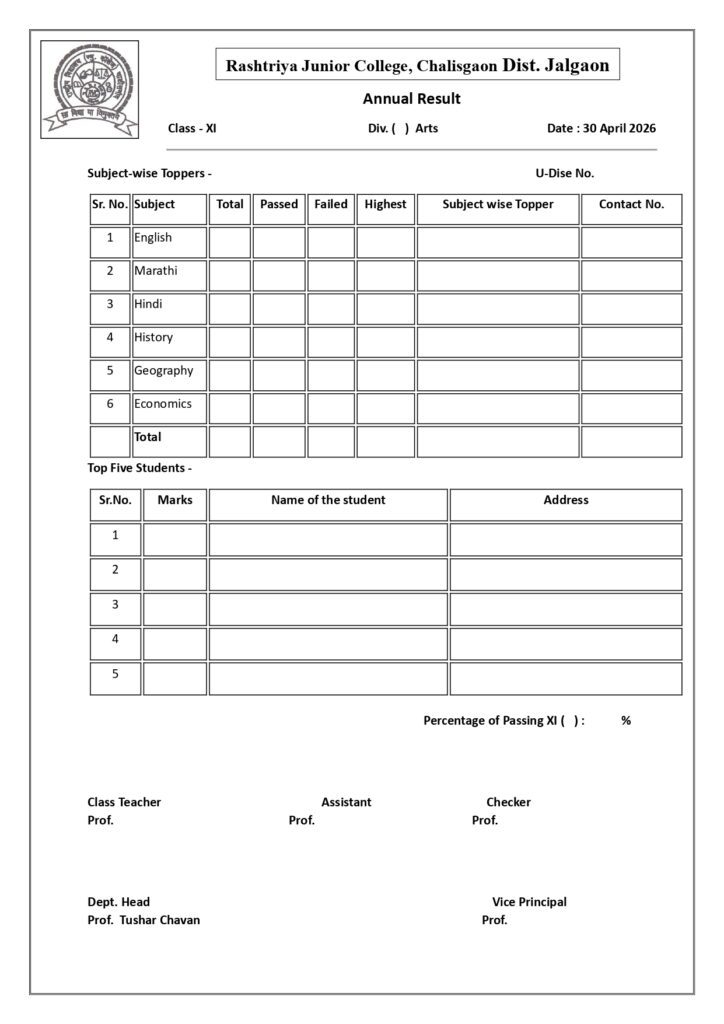
Booklet Front Page in Word file. This file can be edited.
खाली दिलेली वर्ड फाईल डाउनलोड करा व त्यात बदल करून वापरा.
Download Word file of Front Page
👇
Total Grade
Marks and assigned Grade:
| 35 to 44.99 | – Pass |
| 45 to 59.99 | – II |
| 60 to 74.99 | – I |
| 75 to above | – Dist ( Distinction) |
See the Video to make the result software.
निकाल सॉफ्टवेअर बनवण्यासाठी व्हिडिओ पहा.
How to make Std XI Result software-Arts Faculty: Video
Read More-
Workload for Jr. College Teacher
Simple, Compound and Complex Sentence

Std XI Result software for Commerce
By linking MS- Excel file to MS- Word Files, the result software is created. Download three sheets and save them in new single folder on PC or Laptop.
This software can’t run on cell phone or mobile phone.
एमएस-एक्सेल फाईल एमएस-वर्ड फाईल्सशी लिंक करून, रिझल्ट सॉफ्टवेअर तयार केले आहे. तीन शीट्स डाउनलोड करा आणि त्या पीसी किंवा लॅपटॉपवर एकाच नवीन फोल्डरमध्ये सेव्ह करा.
हे सॉफ्टवेअर सेल फोन किंवा मोबाईल फोनवर चालू शकत नाही.
Download the following three files. One is Excel file while other two are Word files. Excel file is linked with the Word files. So if you want to make any changes in marks or student name, do it in Excel file.
खालील तीन फाईल्स डाउनलोड करा. एक एक्सेल फाईल आहे तर अन्य दोन वर्ड फाईल्स आहेत. एक्सेल फाईल वर्ड फाईल्सशी जोडलेली आहे. म्हणून जर तुम्हाला गुणांमध्ये किंवा विद्यार्थ्यांच्या नावात काही बदल करायचे असतील तर ते एक्सेल फाईलमध्ये करा.
Demo names and marks are filled in the Excel and Word files. Replace them with the names of your college students and their respective marks.
एक्सेल आणि वर्ड फाईल्समध्ये डेमो नावे आणि गुण भरलेले आहेत. त्याऐवजी तुमच्या महाविद्यालयीन विद्यार्थ्यांची नावे आणि त्यांचे संबंधित गुण लिहा.
Fill names of students only in English Subject consolidated Excel Sheet. These names will be available in all other subjects Sheets as well as Big Consolidated Sheet.
विद्यार्थ्यांची नावे फक्त इंग्रजी विषय एकत्रित एक्सेल शीटमध्ये भरा. ही नावे इतर सर्व विषयांच्या शीटमध्ये तसेच मोठ्या एकत्रित शीटमध्ये उपलब्ध असतील.
Download the consolidated sheet of marks – Excel Sheet (Big Sheet)
1) Excel Big Sheet 2025-2025
1) Click the Excel Big Sheet by clicking to the above words.
वरील शब्दांना क्लीक करून एकत्र गुण तक्ता डाऊनलोड करा. एक्सेल फाइल डाउनलोड होईल. गुण भरण्यासाठी ही डाउनलोड केलेली एक्सेल फाईल वापरा. डेमो गुण भरलेले आहेत. तेथे शून्य करून घ्या किंवा आपल्या विदयार्थ्यांना मिळालेले गुण भरा. बेरीज व सरासरी आपोआप येईल. विदयार्थी नावे इंग्रजी विषयाच्या शीट मध्ये टाका. अन्य सर्व विषयांच्या शीट मध्ये आपोआप नावे येतील. Annual Big Sheet मध्ये आपोआप सर्व गुण येतात.
2) Save as the sheet using new name in your P.C. or Laptop.
तुमच्या P.C किंवा लॅपटॉप मध्ये संकलित तक्ता नवीन नाव वापरून सेव्ह करा.
3) Fill consolidate sheet with marks of unit test 1 and 2, first term exam, annual exam.
युनिट चाचणी 1 आणि 2 च्या गुणांसह प्रथम सत्र परीक्षा, वार्षिक परीक्षा यांचे गुण भरा.
4) Annual exam marks include oral or internal evaluation marks.
वार्षिक परीक्षेतील गुणांमध्ये तोंडी किंवा अंतर्गत मूल्यमापन या गुणांचा समावेश होतो.
5) For languages there are 20 marks for oral exam.
भाषांसाठी तोंडी परीक्षेसाठी 20 गुण आहेत.
6) For other subjects like- S.P., O.C., B.K., Economics have Internal exam for 20 Marks.
इतर विषयांसाठी जसे- एस.पी., ओ.सी., बी.के. व इकॉनॉमिक्स साठी 20 गुणांसाठी अंतर्गत परीक्षा असते.
7) If the number of students are more than 80, just drag each excel chart selecting all last cells.
विद्यार्थ्यांची संख्या 80 पेक्षा जास्त असल्यास, सर्व शेवटचे सेल निवडून प्रत्येक एक्सेल चार्ट ड्रॅग (खाली खेचा)करा.
To get Std XI Result software for Commerce Faculty, download the booklet. It is Excel file.
2) Marksheet 2025-2026 – MS – Word File
3) Booklet 2025-2026 – MS – Word File
Note that-
1) Change the required information in Marksheet and Booklet. Do not change marks in Marksheet amd Booklet. These marks can be changed using consolidated sheet of marks. It is Excel file.
मार्कशीट आणि बुकलेटमधील आवश्यक माहिती बदला. मार्कशीट आणि बुकलेटमधील गुण बदलू नका. हे गुण एकत्रित गुणपत्रक वापरून बदलता येतात. ही एक्सेल फाइल आहे.
2) Subject names can be chaged by editing the Word files of Marksheet and Booklet.
मार्कशीट आणि बुकलेटच्या वर्ड फाईल्स एडिट करून विषयांची नावे बदलता येतात.

New Result Software- Science
Download the consolidated sheet of marks – Excel Sheet (Big Sheet)
Excel Big Sheet 2025-2025
1) Download the combined marks table by clicking on the words above.
वरील शब्दांना क्लीक करून एकत्र गुण तक्ता डाऊनलोड करा.
Download वर क्लिक करा. एक्सेल फाइल डाउनलोड होईल. गुण भरण्यासाठी ही डाउनलोड केलेली एक्सेल फाईल वापरा. सर्व काम याच शीट मध्ये करा.
2) Save as the sheet using new name in your P.C. or Laptop.
तुमच्या P.C किंवा लॅपटॉप मध्ये संकलित तक्ता नवीन नाव वापरून सेव्ह करा.
3) Fill consolidate sheet with marks of unit test 1 and 2, first term exam, annual exam.
युनिट चाचणी 1 आणि 2 च्या गुणांसह प्रथम सत्र परीक्षा, वार्षिक परीक्षा यांचे गुण भरा.
4) Annual exam marks include oral or internal evaluation marks.
वार्षिक परीक्षेतील गुणांमध्ये तोंडी किंवा अंतर्गत मूल्यमापन किंवा प्रात्यक्षिक परीक्षा या गुणांचा समावेश होतो.
5) For languages there are 20 marks for oral exam.
भाषांसाठी तोंडी परीक्षेसाठी २० गुण आहेत.
6) For other subjects like- Physics, Chemistry, Biology and Mathematics have Practical exam.
इतर विषयांसाठी जसे- भौतिकशास्त्र, रसायनशास्त्र, जीवशास्त्र आणि गणित या विषयांची 20/30 गुणांची प्रात्यक्षिक परीक्षा असते..
7) For subjects like Geography, there are 20 marks for the practical exam.
भूगोलासारख्या विषयांसाठी प्रात्यक्षिक परीक्षेसाठी २० गुण असतात.
Marksheet 2025-2026 – MS – Word File
Booklet 2025-2026 – MS – Word File
Grace Marks for Std. XI
उच्च माध्यमिक प्रमाणपत्र परीक्षेसंबंधात मंडळ नियमावली नियम क्र. ९९ मधील ३ नुसार उच्च माध्यमिक प्रमाणपत्र मिळविण्यासाठी आवश्यक असलेल्या सर्व विषयांसाठी एकाच वेळी त्याच परीक्षेस प्रविष्ठ होणारा एखादा उमेदवार एका किंवा अधिक विषयात अनुत्तीर्ण होईल तर एका किंवा अधिक विषयात त्याला कमी गुण मिळाले असतील तर, एकूण कमाल १५ गुण परंतु कोणत्याही एका विषयात १०% पेक्षा जास्त असणार नाहीत इतक्या अनुग्रह गुणांची त्याला सवलत देण्यात यावी.
ही सवलत फक्त घेतलेल्या एकूण विषयांपैकी ३ विषयांपुरतीच मर्यादित असेल.
त्याचप्रमाणे इ. ११वी साठी १५ गुण अनुग्रह देण्यात येऊ न इ.१२वी प्रमाणे अनुग्रह गुण इ.११वीला देण्यात यावेत.
Grace Marks-
Total Grace Marks – 15
Grace marks are applicable for three subjects.
Maximum Grace marks for one subject are 10.
e.g.
Student can get grace marks as 3+2+10 for three subjects if he or she has 35% or more marks in other subjects.
See the official letter-
Chart of Environment and Water Security-
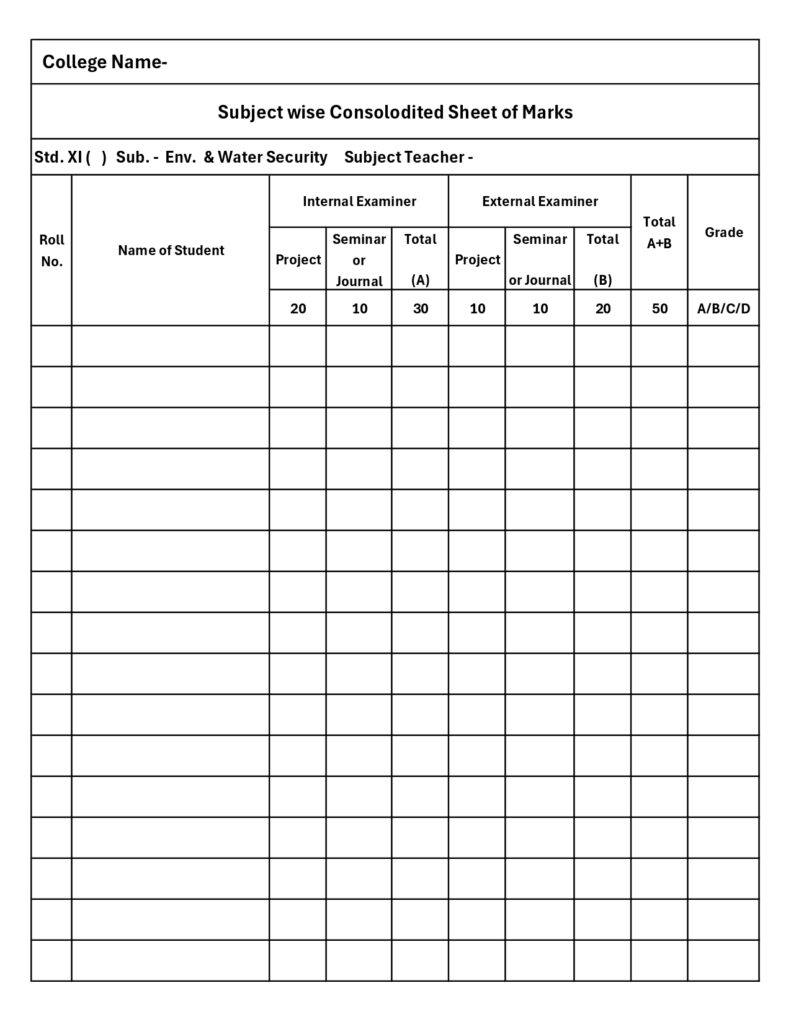
Circular about Environment and Water Security-
पर्यावरण विषयाचे गुण कसे असतील. पत्र डाउनलोड करा.
👇
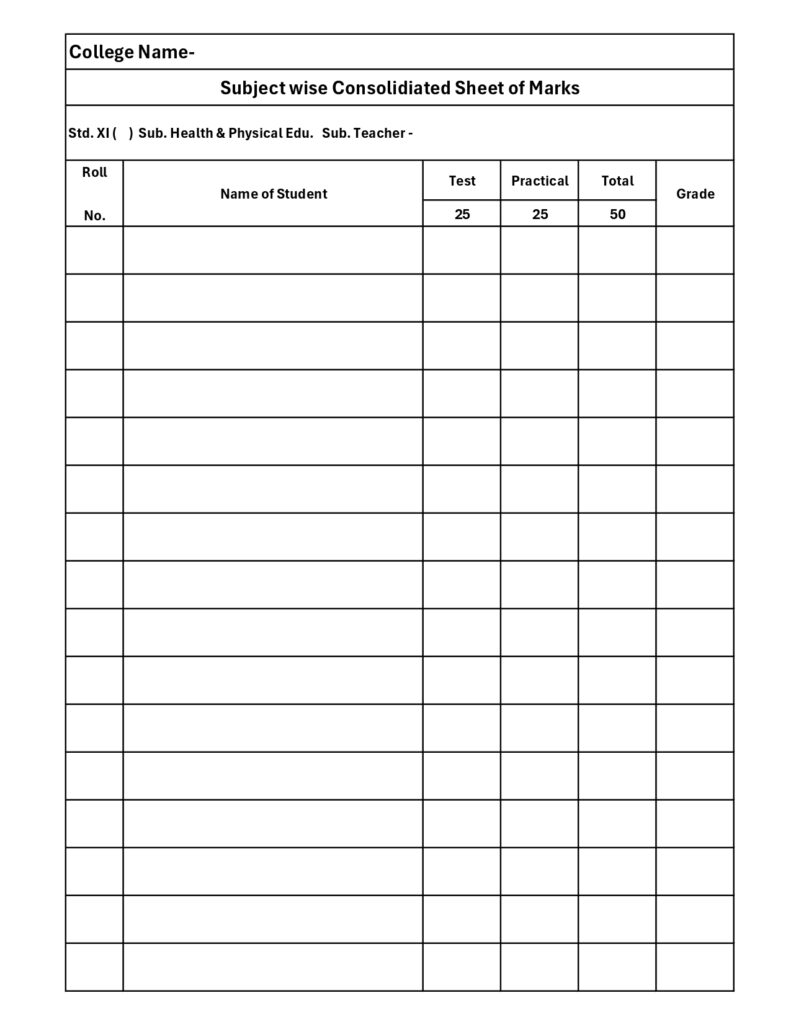
Circular about Health and Physical Education-
आरोग्य व शारीरिक शिक्षण गुण कसे असतील. पत्र डाउनलोड करा.
👇
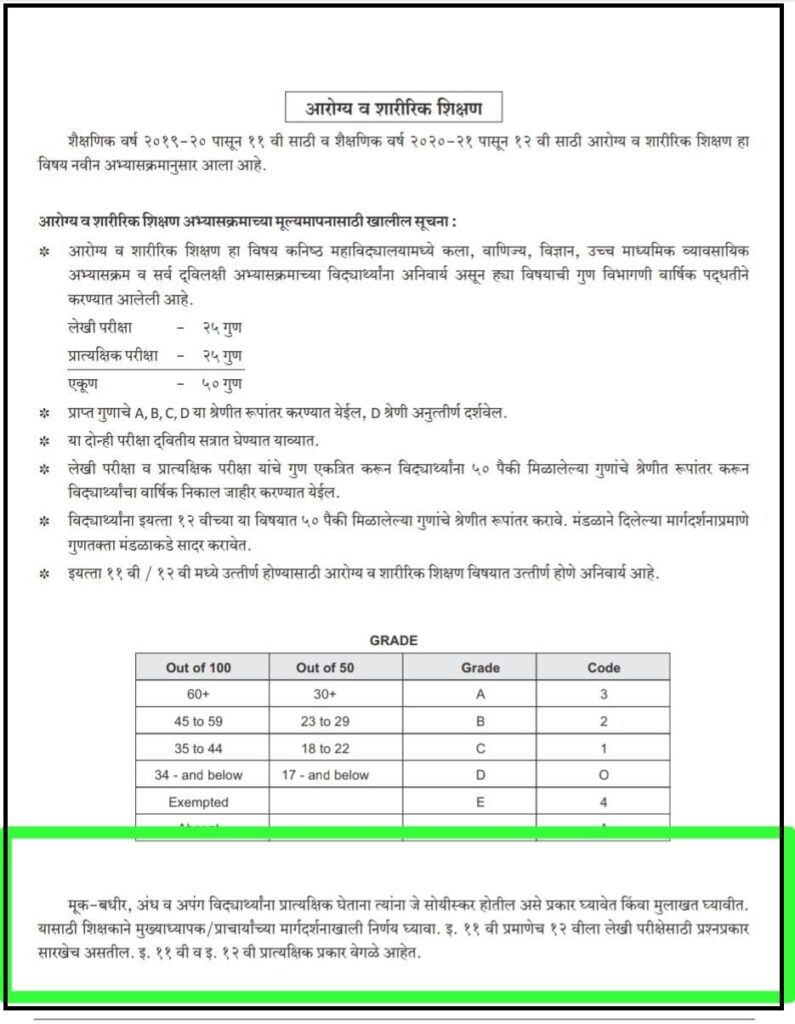
Health and Physical Education – Chart